Mechanic / Crystal PvP / Beginner
Learn how to hit an opponent against a wall and place a Cobweb in their head position to trap them during the resulting knockback.
Crystal PvPBeginner5 min readJava Edition Beta 1.8 Pre-release+Verified Sep 16, 2026
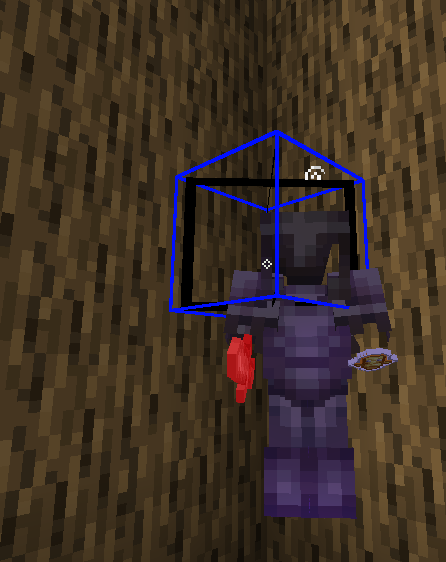
Head-webbing is a technique where Player 1 hits Player 2 against a wall and places a Cobweb in the space above their head.
The wall keeps Player 2 in a restricted position while the attack moves them into the area where the Cobweb has been placed.
The Cobweb is placed in the third block up, at the height of Player 2's head. This is the defining placement used for a Head-web.
In this guide, Player 1 refers to the player performing the Head-web and Player 2 refers to the opponent.
Player 1 first positions Player 2 against a wall.
Player 1 then hits Player 2 and immediately places a Cobweb in the block at their head level.
The attack applies knockback to Player 2 while the game resolves their resulting movement. The Cobweb needs to be placed in the position Player 2 is being moved toward.
This is why the technique has to be performed quickly. The placement needs to be ready before Player 2 moves past the intended position.
The basic sequence is:
Position Player 2 against a wall → hit → place the Cobweb at head level
Player 2 needs to be against a wall or another solid object.
This gives Player 1 a predictable area in which to perform the setup and prevents Player 2 from simply moving away from the wall.
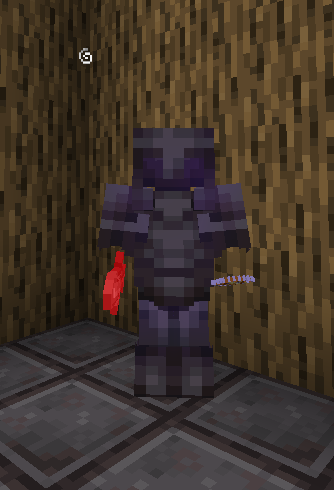
The closer Player 2 is to the wall, the less space there is between the target and the intended Head-web position.
Player 1 hits Player 2 while they are against the wall.
The hit is important because it creates the knockback used by the setup.
Player 1 should already be prepared to place the Cobweb immediately after the attack connects.
The Head-web is not performed by placing the Cobweb first and then attacking.
The hit establishes Player 2's position and movement for the setup.
Related guides based on the learning path, explicit relationships, and matching topic metadata.
Immediately after the hit, Player 1 places a Cobweb in the third block above the ground, where Player 2's head is positioned.
This is the characteristic Head-web placement described in Java PvP guides.
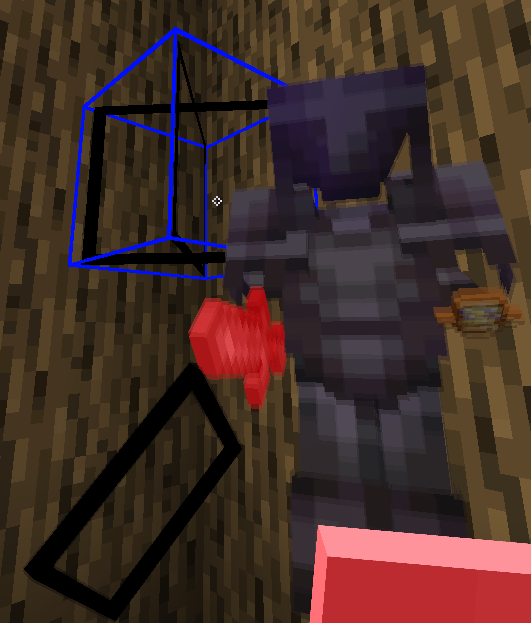
The Cobweb should be placed above Player 2's body rather than at their feet.
The goal is for Player 2 to move into the Cobweb as the knockback from the hit takes effect.
Once the Cobweb is in place, Player 2's movement carries them into it.
Cobwebs heavily slow players and other entities that come into contact with them, making it difficult for the trapped player to move normally.
This is what separates a Head-web from simply placing a Cobweb on an opponent.
The Cobweb is positioned to catch the opponent's movement created by the hit.
The timing is the most important part of the technique.
The sequence should be:
Hit Player 2 → immediately place the Cobweb → Player 2 moves into the web
Player 1 does not have to wait for the knockback to finish before placing the Cobweb.
The placement needs to happen during the short window in which Player 2 is being moved toward the intended position.
A slow placement can result in Player 2 passing the position before the Cobweb is ready.
The Cobweb should occupy the block at Player 2's head level.
A PvP reference describes the Head-web as placing the Cobweb in the opponent's head, specifically the third block up.
Placing the web too low can cause it to catch the wrong part of the player's movement.
Placing it too high can allow Player 2 to pass underneath it.
The important reference point is therefore Player 2's head, not the player's feet.
A Head-web is primarily useful because the Cobweb severely restricts Player 2's movement once they are caught.
The Java PvP guide specifically describes Head-webs as an offensive use of Cobwebs against a player backed against a wall.
What Player 1 does after the web depends on the PvP situation, but the immediate objective is to keep Player 2 trapped long enough to continue the attack.
Placing the web before the hit can put it in the wrong position relative to Player 2's movement.
Fix: Land the hit first, then place the Cobweb immediately.
A low Cobweb may not catch Player 2's movement correctly.
Fix: Place it at Player 2's head level, in the third block up.
Player 2 can move underneath a web that is positioned too high.
Fix: Use Player 2's head as the visual reference.
Player 2 may move past the intended position before the Cobweb is placed.
Fix: Make the placement immediately after the hit.
More space between Player 2 and the wall makes the setup less controlled.
Fix: Begin the Head-web with Player 2 already close to the wall.
Head-webbing combines two mechanics:
Knockback moves Player 2 toward the setup.
Cobwebs severely slow Player 2 once they make contact.
The Head-web places the Cobweb in the exact area where Player 2 is expected to move after being hit.
The technique therefore depends primarily on positioning and fast block placement, rather than on placing the Cobweb randomly after hitting the opponent.
The basic sequence is:
Get Player 2 against a wall → hit them → immediately place the Cobweb at head level → catch their movement
The most important parts are:
Hit first.
Place the Cobweb immediately.
Place it at Player 2's head level.
Keep Player 2 close to the wall.
A successful Head-web uses the opponent's knockback to move them directly into a Cobweb, where their movement is heavily restricted.
Attribute Swapping is a Minecraft PvP technique that allows Player 1 to combine properties of two different items during an attack or item use.
